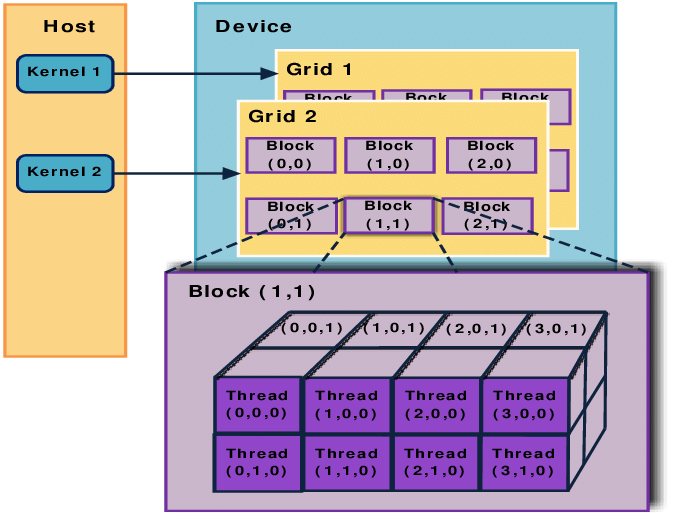
CUDA (Compute Unified Device Architecture) is a parallel computing platform and programming model developed by NVIDIA. It enables developers to harness the power of NVIDIA GPUs for general-purpose processing tasks, extending the traditional graphics capabilities of GPUs to perform complex calculations for a wide range of applications, such as scientific simulations, deep learning, and image processing. CUDA is built on C/C++ but also has bindings for other languages, making it accessible for developers who want to leverage GPU acceleration.
Key Concepts in CUDA Programming
- Parallel Computing:
- CUDA allows applications to run many calculations in parallel. Instead of running serially on a CPU, CUDA breaks down tasks into thousands of smaller sub-tasks, each handled by a GPU core.
- This is particularly beneficial for operations that can be divided into independent tasks, such as matrix operations, data processing, and simulations.
- Thread Hierarchy:
- CUDA uses a unique thread hierarchy that helps manage parallel execution:
- Threads are the smallest units of execution in CUDA and are grouped into blocks.
- Blocks are organized into grids. Each thread, block, and grid can be given specific indexes to manage data.
- Each thread can execute the same or different instructions across data, allowing massive parallelism.
- Kernel Functions:
- In CUDA, the main function that runs on the GPU is called a kernel. A kernel function is executed in parallel by multiple threads on the GPU.
- To launch a kernel, you specify the number of blocks and threads per block. For example, a simple kernel launch might look like
myKernel<<<numBlocks, numThreads>>>(args);.
- Memory Management:
- CUDA programs manage several types of memory:
- Global Memory: Accessible by all threads but has relatively high latency.
- Shared Memory: Located on-chip and accessible by threads within the same block, offering low latency.
- Registers: Fastest storage, limited to individual threads.
- Effective memory management is crucial for CUDA performance, as GPUs are particularly sensitive to memory access patterns.
- CUDA programs manage several types of memory:
- CUDA C/C++ API:
- CUDA is primarily written using CUDA C/C++, which includes extensions to C/C++ for managing parallelism and memory on the GPU.
- These extensions allow for explicit control over memory allocation, data transfer between CPU and GPU, and kernel invocation.
- Device and Host Code:
- CUDA code is split between host (CPU) and device (GPU) code. The CPU runs the host code, which launches kernels on the GPU.
- Typically, data is transferred from the host to the device, processed on the GPU, and then transferred back to the host.
Basic Workflow in CUDA Programming
- Allocate Memory:
- Allocate memory on the GPU using
cudaMalloc()for storing data needed by the kernel.
- Allocate memory on the GPU using
- Transfer Data:
- Transfer data from the CPU (host) to the GPU (device) using
cudaMemcpy().
- Transfer data from the CPU (host) to the GPU (device) using
- Kernel Launch:
- Launch a kernel function with a specified configuration of blocks and threads.
- Device Synchronization:
- Use synchronization functions, such as
cudaDeviceSynchronize(), to ensure all threads have completed execution before proceeding.
- Use synchronization functions, such as
- Transfer Results:
- Copy the results back from the GPU to the CPU.
- Free Memory:
- Free any allocated GPU memory using
cudaFree()to prevent memory leaks.
- Free any allocated GPU memory using
Example Code in CUDA
Here’s a basic CUDA example where each thread adds two numbers in parallel:
#include <iostream>

__global__ void add(int *a, int *b, int *c) {
    int index = threadIdx.x;
    c[index] = a[index] + b[index];
}

int main() {
    int n = 10;
    int a[n], b[n], c[n];

    // Initialize arrays
    for (int i = 0; i < n; i++) {
        a[i] = i;
        b[i] = i * 2;
    }

    // Allocate memory on GPU
    int *d_a, *d_b, *d_c;
    cudaMalloc((void **)&d_a, n * sizeof(int));
    cudaMalloc((void **)&d_b, n * sizeof(int));
    cudaMalloc((void **)&d_c, n * sizeof(int));

    // Copy data from host to device
    cudaMemcpy(d_a, a, n * sizeof(int), cudaMemcpyHostToDevice);
    cudaMemcpy(d_b, b, n * sizeof(int), cudaMemcpyHostToDevice);

    // Launch kernel with n threads
    add<<<1, n>>>(d_a, d_b, d_c);

    // Copy result back to host
    cudaMemcpy(c, d_c, n * sizeof(int), cudaMemcpyDeviceToHost);

    // Print the result
    for (int i = 0; i < n; i++) {
        std::cout << c[i] << " ";
    }

    // Free device memory
    cudaFree(d_a);
    cudaFree(d_b);
    cudaFree(d_c);

    return 0;
}
Tips for Optimizing CUDA Programs
- Minimize Memory Transfers: Transfers between CPU and GPU memory are relatively slow. Minimize data transfers to increase performance.
- Optimize Thread and Block Configuration: Choosing the right number of threads and blocks is essential. Utilize CUDA’s occupancy calculator to help determine the best configuration.
- Leverage Shared Memory: Use shared memory for frequently accessed data by threads within the same block, as it’s faster than global memory.
- Avoid Divergent Branching: Avoid conditional statements that might cause different threads to follow different execution paths (known as warp divergence).
- Use the Latest Hardware: Newer GPUs offer advanced features and improved memory bandwidth, contributing to better performance.
Applications of CUDA Programming
CUDA programming is widely used in fields such as:
- Artificial Intelligence and Machine Learning: Speeding up deep learning training and inference with frameworks like TensorFlow and PyTorch.
- Scientific Computing: Running simulations for physics, chemistry, and biology.
- Cryptography and Finance: Accelerating cryptographic calculations and financial modeling.
- Multimedia and Gaming: Processing graphics and handling compute-intensive tasks in game development.
CUDA programming opens up vast possibilities for developers to accelerate computational tasks, achieving significant speedups over traditional CPU-only approaches. Its powerful API and adaptability make it a key technology in high-performance computing today.












 Not Rocket Science!
Leave a comment