SIMD (Single Instruction, Multiple Data) is a parallel computing model that allows a single operation (instruction) to be applied to multiple data points simultaneously. The primary reasons for using SIMD are efficiency, speed, and optimized use of computational resources, especially in applications that involve processing large datasets or repetitive computations.
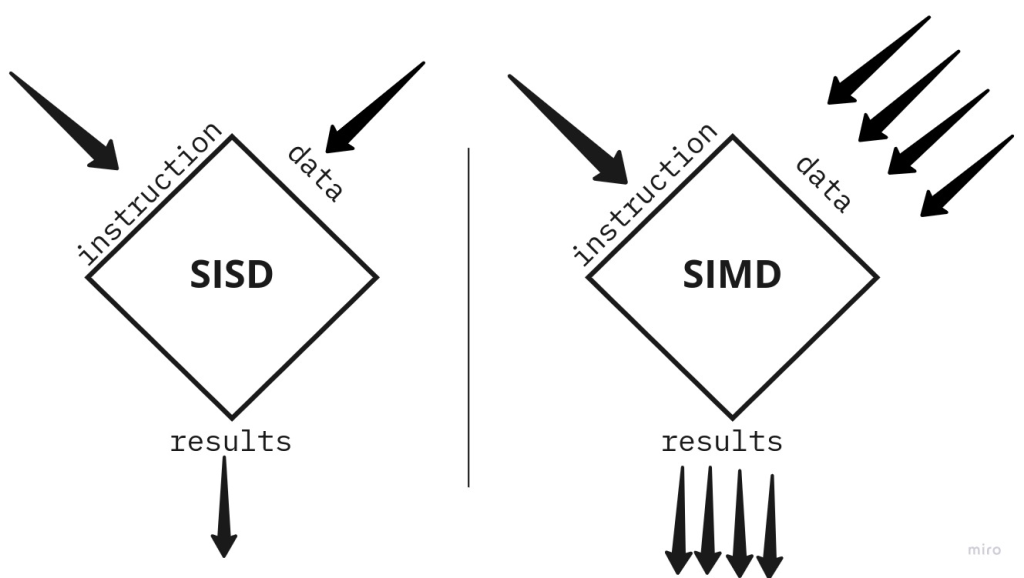
Why do we need to use SIMD?
- Improves Performance Through Parallelism
- SIMD executes the same instruction on multiple pieces of data in a single clock cycle, allowing a significant increase in throughput.
- Instead of looping through each data element sequentially, SIMD can handle multiple elements in parallel, reducing the time required for computation. Example: If you need to add two arrays of numbers, a SIMD operation can perform multiple additions in parallel, completing the task much faster than with traditional single-data (scalar) instructions.
- Optimizes Resource Utilization
- CPUs and GPUs often include wide registers (128, 256, or even 512 bits) that can hold multiple values at once.
- SIMD takes advantage of these wide registers by loading multiple data elements, thereby optimizing CPU/GPU resources and reducing memory access times.
- It minimizes the instruction overhead, as only one instruction is needed per group of data points rather than per element.
- Energy Efficiency
- SIMD operations require fewer instructions and less memory access, which can reduce the power consumption of the processor.
- By reducing the number of cycles needed for a task, SIMD can help conserve battery life, which is particularly valuable in mobile and embedded devices.
- Reduced Memory Bottlenecks
- SIMD can help reduce the memory bandwidth demands of an application by operating on blocks of data rather than accessing each element individually.
- Accessing data in parallel improves cache utilization and reduces the load on the memory bus, improving overall system performance.
- Essential for Real-Time and High-Performance Applications
- SIMD is widely used in applications that require real-time data processing, such as video processing, gaming, scientific simulations, and financial modeling.
- For instance, in video encoding/decoding, SIMD allows pixel-level operations (like color adjustments or filters) to be applied quickly across multiple pixels at once, making real-time video processing feasible.
Examples of SIMD Applications
- Image and Video Processing: SIMD allows operations like filtering, blurring, or color transformation on multiple pixels at once, making it possible to render high-resolution images and videos smoothly.
- Scientific and Engineering Calculations: Many scientific calculations involve large matrices or arrays. With SIMD, you can perform matrix operations (like multiplication or addition) across rows or columns simultaneously.
- Machine Learning and AI: Many neural network operations, such as matrix multiplications in deep learning, benefit from SIMD. It speeds up the calculation of large neural networks and enables real-time inference.
- Signal Processing: Audio processing, radar, sonar, and other forms of digital signal processing require fast Fourier transforms (FFTs), convolutions, and filtering, all of which can be accelerated with SIMD.

Example without SIMD vs. with SIMD
Suppose you have two arrays, each containing 1,000,000 elements, and you want to add them.
- Without SIMD (Scalar Processing):
   for (int i = 0; i < 1000000; i++) {
       result[i] = array1[i] + array2[i];
   }
- Each element addition happens one at a time.
- This loop runs a million times and processes one element per instruction.
- With SIMD (AVX 256-bit Example):
   for (int i = 0; i < 1000000; i += 8) {
       __m256 vec1 = _mm256_loadu_ps(&array1[i]);
       __m256 vec2 = _mm256_loadu_ps(&array2[i]);
       __m256 vecResult = _mm256_add_ps(vec1, vec2);
       _mm256_storeu_ps(&result[i], vecResult);
   }
- Here, 8 elements are processed at once because AVX 256-bit registers can hold eight 32-bit floats.
- The loop runs only 125,000 times, not a million, significantly reducing the number of cycles.
Challenges with SIMD
- Data Alignment Requirements: SIMD often requires data to be aligned in memory, which can complicate programming.
- Conditional Branching: SIMD is less effective for data with many branches (if/else) or dependencies between elements because it performs the same operation on all data elements in a vector.
- Limited to Specific Use-Cases: Not every task benefits from SIMD; it’s most effective when applying the same operation to independent data points.
How do we use SIMD?
Using SIMD requires understanding how to work with vectorized instructions and intrinsics provided by CPU architectures like Intel’s SSE/AVX, ARM’s NEON, or Qualcomm’s HVX. Here’s a guide on how to implement SIMD, including practical steps and code examples across different platforms.
1. Identify the SIMD-Compatible Task
- SIMD is ideal for tasks where the same operation needs to be performed on a large set of independent data points.
- Examples include array addition, matrix multiplication, applying image filters, and audio or signal processing.
2. Use SIMD Intrinsics for Your Target Platform
- SIMD instructions are accessible through intrinsics: functions that map directly to low-level SIMD instructions but are still compatible with high-level languages like C/C++.
- Intrinsics are provided by the compiler and are specific to each architecture (e.g., AVX for Intel, NEON for ARM).
3. Set Up Your Environment
- To use SIMD intrinsics, include the appropriate header files:
- Intel SSE/AVX:
#include <immintrin.h> - ARM NEON:
#include <arm_neon.h> - Qualcomm HVX:
#include <hexagon_protos.h>
- Intel SSE/AVX:
- Enable appropriate compiler flags to target specific SIMD instructions, like
-mavxor-mavx2for AVX on Intel, or-mfpu=neonfor ARM NEON.
4. Basic SIMD Code Examples
Example 1: Array Addition Using AVX (Intel x86/x64)
Let’s add two arrays of floats using AVX (256-bit registers, holding eight 32-bit floats per register):
#include <immintrin.h>
#include <iostream>

void add_arrays_avx(const float *a, const float *b, float *result, int n) {
    int i;
    for (i = 0; i < n; i += 8) {  // Process 8 floats at a time
        __m256 vec_a = _mm256_loadu_ps(&a[i]);     // Load 8 floats from array a
        __m256 vec_b = _mm256_loadu_ps(&b[i]);     // Load 8 floats from array b
        __m256 vec_result = _mm256_add_ps(vec_a, vec_b); // Add vectors
        _mm256_storeu_ps(&result[i], vec_result);  // Store result back to memory
    }
}

int main() {
    const int n = 16;
    float a[n] = {1, 2, 3, 4, 5, 6, 7, 8, 9, 10, 11, 12, 13, 14, 15, 16};
    float b[n] = {10, 20, 30, 40, 50, 60, 70, 80, 90, 100, 110, 120, 130, 140, 150, 160};
    float result[n];

    add_arrays_avx(a, b, result, n);

    for (int i = 0; i < n; ++i) {
        std::cout << result[i] << " ";
    }

    return 0;
}
- Explanation:
_mm256_loadu_psloads 8 floats from the array._mm256_add_psperforms element-wise addition of 8 floats in parallel._mm256_storeu_psstores the results back to memory.
Example 2: Array Addition Using NEON (ARM Architecture)
On ARM processors, we use the NEON intrinsics, which operate on 128-bit registers (handling four 32-bit floats at once):
#include <arm_neon.h>
#include <iostream>

void add_arrays_neon(const float *a, const float *b, float *result, int n) {
    int i;
    for (i = 0; i < n; i += 4) {  // Process 4 floats at a time
        float32x4_t vec_a = vld1q_f32(&a[i]);     // Load 4 floats from array a
        float32x4_t vec_b = vld1q_f32(&b[i]);     // Load 4 floats from array b
        float32x4_t vec_result = vaddq_f32(vec_a, vec_b); // Add vectors
        vst1q_f32(&result[i], vec_result);        // Store result back to memory
    }
}

int main() {
    const int n = 8;
    float a[n] = {1, 2, 3, 4, 5, 6, 7, 8};
    float b[n] = {10, 20, 30, 40, 50, 60, 70, 80};
    float result[n];

    add_arrays_neon(a, b, result, n);

    for (int i = 0; i < n; ++i) {
        std::cout << result[i] << " ";
    }

    return 0;
}
- Explanation:
vld1q_f32loads 4 floats into a NEON register.vaddq_f32performs parallel addition on the vectors.vst1q_f32stores the results back to the array.
Example 3: Using SIMD in Python (NumPy)
For rapid prototyping and scientific computation, Python libraries like NumPy offer SIMD optimizations under the hood without explicit SIMD intrinsics.
import numpy as np

# Create two large arrays
a = np.array([1.0, 2.0, 3.0, 4.0, 5.0, 6.0, 7.0, 8.0], dtype=np.float32)
b = np.array([10.0, 20.0, 30.0, 40.0, 50.0, 60.0, 70.0, 80.0], dtype=np.float32)

# SIMD-optimized array addition
result = a + b

print(result)
- Explanation: NumPy leverages SIMD instructions (like AVX or NEON) internally, providing an optimized way to perform element-wise operations without explicitly writing SIMD code.
5. Compile with SIMD Optimization Flags
To ensure SIMD code is compiled with appropriate optimizations, use flags:
- Intel:
-mavx,-mavx2, or-march=native(enables all CPU features available on the host). - ARM:
-mfpu=neon(for NEON SIMD on ARM processors).
# Compiling with AVX enabled
g++ -o add_arrays_avx add_arrays_avx.cpp -mavx

# Compiling with NEON enabled
g++ -o add_arrays_neon add_arrays_neon.cpp -mfpu=neon
6. Limitations of SIMD
- Data Alignment: Some SIMD instructions require data to be aligned in memory, which may require special handling (e.g.,
mallocwith alignment). - Control Flow: SIMD doesn’t handle branching well; it’s most efficient with linear operations across independent data.
- Vector Length Dependency: Ensure the input data size is a multiple of the vector length (e.g., 8 for AVX 256-bit) to avoid handling remaining elements separately.
When to Use SIMD
SIMD is ideal for:
- Large data sets with simple, repetitive calculations (e.g., matrix or vector operations).
- Applications requiring high performance (e.g., scientific simulations, real-time video processing).
- Low-power devices where energy efficiency is essential, like mobile phones and embedded systems.
By using SIMD, you unlock significant performance benefits for data-parallel applications, improving speed and resource efficiency across platforms.
In Summary
SIMD is essential for maximizing performance in applications with repetitive, data-parallel tasks. By enabling parallelism at the instruction level, SIMD improves performance, reduces power consumption, and allows real-time processing in applications where speed is critical. It’s foundational in fields like image processing, machine learning, and high-performance computing and is widely supported on modern CPUs, GPUs, and specialized processors.












 Not Rocket Science!
Leave a comment